
The Simple Task Management System Every Creator Actually Needs
You don't need a complicated workflow to stay on top of your creative business. You need one clear system and the habit to use it.

There is a specific kind of overwhelm that most productivity advice never talks about. It is not the overwhelm of having too much to do, although that is real. It is the overwhelm of not knowing what to do next. You have ideas scattered across voice memos, tasks buried in text messages, content deadlines living only in your memory, and a growing sense that something important is always slipping through the cracks. most often is not that you’re unproductive it that you don’t have a system and those are very different problems with very different solutions.
For creative entrepreneurs, that distinction matters enormously. Your work requires mental bandwidth for ideation, for creation, for showing up with clarity and focus in front of your audience. Every moment you spend mentally tracking tasks that should be written down somewhere is a moment stolen from the work that actually moves your mission forward. That is what a task management system is designed to protect, not your schedule but your creative energy.
And the good news is that it does not need to be complicated to work.
Why Most Creators Don’t Have a Task System That Actually Sticks
If you have tried to build a task management habit before and it eventually fell apart, I want you to know that this is not a character flaw. It is almost always a design flaw. The system was too complex to maintain, required too many steps to capture something quickly, or didn’t map to the actual rhythm of your creative week. You didn’t fail the system, the system failed you.
The trap most creators fall into is building their task system around someone else’s workflow. They watch a productivity video, get inspired, and try to replicate a system that was designed for a project manager at a corporate company or an entrepreneur running a team of twenty people. But you are likely a solopreneur, a one-person creative business, or a creator wearing every hat at once. Your system needs to reflect that reality, not fight it.
What works is a system that is simple enough to use when you are tired, flexible enough to hold creative work alongside business admin, and accessible enough that you actually open it every day. That system exists and if you are already in the Apple ecosystem, it is already on your device.
A Simple Task Management System Built for Creators
This week’s YouTube video walks through exactly how I use Apple Reminders as my full task management system as a creative entrepreneur the lists I keep, how I capture ideas on the go, and the weekly habit that holds the whole thing together. I want to use this article to give you the written foundation so you can build it yourself, step by step, starting today.
The system has three layers: how you organize your tasks, how you capture new ones, and how you review what’s there. Each layer is simple on its own. Together, they create something that actually functions as a complete task management practice for the way creators work.
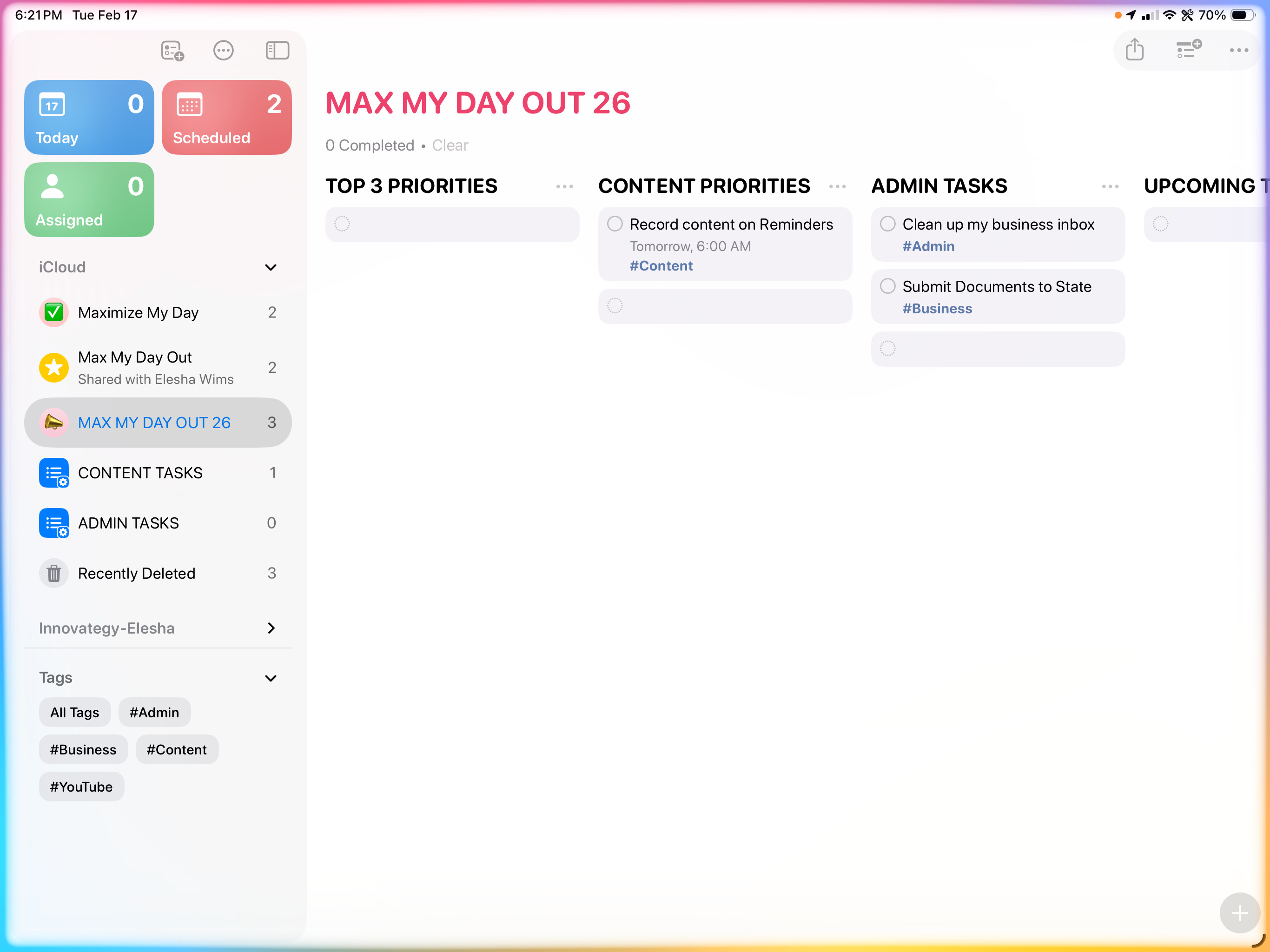
Layer One: Organize Around Four Lists, Not Fifty
The first thing that makes most task systems collapse is over-categorization. When you create a separate list for every project, every client, every area of life, and every random idea category you can think of, the system becomes a project in itself.
Instead, build your entire task system around four core lists and commit to keeping them. The first list is Content, and it holds every task connected to your creative output — ideas you want to develop, videos to record, articles to write, episodes to edit, and posts to schedule. The second list is Business, and it covers the operational side of your work — emails to send, invoices to follow up on, partnerships to explore, and any admin task that keeps your creative business functioning. The third list is Personal, which holds appointments, errands, and the life tasks that exist outside of your work. The fourth list is Someday, which is a home for tasks you are not ready to act on yet but absolutely do not want to lose.
Four lists. Everything you need to manage has a home in one of those four places. When a task comes in, your only decision is which of the four buckets it belongs in — and that simplicity is what keeps the system sustainable.
Layer Two: Capture Everything, Immediately
The most common reason creators lose their best ideas and forget their most important tasks is not that they are disorganized. It is that they try to hold things in their memory rather than getting them out of their heads and into a system the moment they arrive.
Building a capture habit means treating your task system like an inbox. The moment a task surfaces in a conversation, on a walk, in the middle of editing a video — it goes into the system immediately. Not later. Not when you get home. Not when you open your laptop. Right then, before it disappears.
In Apple Reminders, the fastest way to do this is through Siri. You can say something as simple as, “Hey Siri, remind me to follow up with the podcast guest tomorrow morning,” and it drops directly into your list without you unlocking your phone or switching apps. That kind of frictionless capture is what separates a system that stays current from one that is always a few days behind and quietly losing your trust.
When you first start building this habit, you will be surprised by how many things were living only in your head that had no right to be there. Getting them out creates an almost immediate sense of mental clarity the same kind of clarity that makes it easier to sit down and do deep creative work, because your mind is not busy playing secretary.
Layer Three: Do a Weekly Review Every Single Week
The weekly review is the hinge that holds the entire system together, and it is the piece that most creators skip which is exactly why most creator task systems eventually become unreliable.
A weekly review does not need to take long. Set a recurring reminder in Apple Reminders for the same time every week, I recommend Sunday evening, before the new week begins, open your Content list and spend ten to fifteen minutes working through three questions. The first question is: what am I publishing or delivering this week? The second is: what tasks can I move, reschedule, or delete because they no longer matter? The third is: what do I need to add that is not already here?
That is the entire review. It is not a planning session. It is not a goal-setting exercise. It is simply a weekly act of stewardship over the tasks and commitments you have already made to yourself and your audience.
Ecclesiastes 3:1 tells us there is a season and a time for every purpose under heaven. A weekly review is how you make sure the right things are getting your time in the right season not just the things that feel urgent in the moment, but the creative work that carries your actual purpose forward.
One Rule That Will Change How Your System Feels
There is one adjustment to how most creators use task apps that will immediately make your system feel less overwhelming, and it is this, only assign a due date to a task that is genuinely due on that date.
This sounds obvious, but the habit of putting a due date on everything because it feels motivating or because you want to get to it soon is one of the fastest ways to destroy your trust in your own system. When reminders fire constantly for tasks that were never truly time-sensitive, your brain starts treating all alerts as noise. Real deadlines get buried and urgency loses its meaning.
Reserve due dates for three kinds of tasks: things with actual external deadlines, time-sensitive reminders tied to a specific day or time, and recurring routines you are intentionally protecting like your weekly review, your content planning session, or your publishing schedule. Everything else lives on your list without a date, visible and accessible whenever you do your review, without creating a false sense of crisis around it.
That single shift alone will make your task system feel calmer, more honest, and significantly easier to trust.

The Real Goal of a Task System as a Creator
It is worth pausing to name what a task management system is actually for, because I think it is easy to lose sight of this when you are deep in building the workflow itself.
The goal is not to become more productive in the way that productivity culture typically frames it more output, more hours, more hustle. The goal is to protect your creative energy so that when you sit down to do the work that matters most to you and your audience, you are fully present for it. You are not mentally juggling a dozen unwritten tasks. You are not anxious about what you might be forgetting. You are not spending your best creative hours trying to remember what needs to happen next.
A simple, well-maintained task system gives you back that bandwidth. It means your mornings can start with creation rather than triage. It means your creative blocks can be actually creative, rather than half-creative and half-administrative. It means you can close your laptop at the end of the day with a real sense of what you did, what you moved forward, and what is waiting for you tomorrow.
That is not a productivity trick, that is sustainable creative stewardship and it is available to you right now, with a free app already on your phone.
If you want to see this system in action, the exact lists I keep in Apple Reminders, how I use it to manage my content workflow, and the settings that make the capture habit effortless, watch this week’s YouTube video. I walk through the full setup so you can follow along and build it on your own device in real time.
That is your system. Simple, free, and ready to support the creative work you were made to do.
This was so good and an answer to a prayer because I was feeling overwhelmed just creating my list and folders in other systems. Thank you Elesha. :)